Azure Active Directory Authentication for Blazor WASM (Part 4: SignalR)
I really thought I was through with Azure Active Directory! Honest! However, another key piece came up. My CloudMud is a real-time pub/sub application that uses SignalR. How do I authenticate to the SignalR connection? Well, like most things, there is a recipe. So let’s get to it.
The Server side of things
Let’s take a look at the unauthenticated version first. I need to integrate SignalR into my app. Fortunately, there is a tutorial for that. I just followed it. This involved:
-
Adding the SignalR NuGet packages to the server project.
-
Adding services to the
Program.cs:builder.Services.AddSignalR();builder.Services.AddResponseCompression(options => \{options.MimeTypes = ResponseCompressionDefaults.MimeTypes.Concat(new[] \{ "application/octet-stream" \});\});
3. Mapping a "hub" in the application builder:
```csharp app.UseResponseCompression(); app.MapHub<GameHub>("/hub");-
Adding a basic hub:
using Microsoft.AspNetCore.SignalR;namespace cloudmud.Server.Hubs\{public class GameHub : Hub\{public string Username\{get => "-";\}public async Task SendMessage(string message)\{await Clients.All.SendAsync("ReceiveMessage", Username, message);\}\}\}
I'm expecting that the authentication will provide the username, so it's just a dummy value for now.
## The Client side of things
After adding the SignalR NuGet packages to the project, all the code is in the `Pages\Index.razor` file:
```csharp@page "/"@using Microsoft.AspNetCore.SignalR.Client;@attribute [AllowAnonymous]@inject NavigationManager NavigationManager@implements IAsyncDisposable
<h1>Hello, world!</h1>
<AuthorizeView>    <NotAuthorized>        <p>You are not authorized.  Data will not be loaded.</p>    </NotAuthorized>    <Authorized>        <div class="form-group">            <label>Message: <input @bind="messageInput" size="50"/></label>        </div>        <button @onclick="Send" disabled="@(!IsConnected)">Send</button>        <hr/>        <ul id="messagedList">            @foreach (var message in messages) {                <li>@message</li>            }        </ul>    </Authorized></AuthorizeView>
@code {    private HubConnection? hub;    private List<string> messages = new List<string>();    private string? messageInput;
    protected override async Task OnInitializedAsync()    {        hub = new HubConnectionBuilder()            .WithUrl(NavigationManager.ToAbsoluteUri("/hub"))            .Build();
        hub.On<string, string>("ReceiveMessage", (user, message) =>        {            messages.Add($"{user}: {message}");            StateHasChanged();        });
        await hub.StartAsync();    }
    private async Task Send()    {        if (hub is not null)        {            await hub.SendAsync("SendMessage", messageInput);        }    }
    public bool IsConnected => hub?.State == HubConnectionState.Connected;
    public async ValueTask DisposeAsync()    {        if (hub is not null)        {            await hub.DisposeAsync();        }    }}
You can actually run this - it will work, but without authentication. Now, let’s add some authentication to this!
The Blazor side of authentication
When you send authorization with a HTTP call, you place it in a header (called Authorization). I can get the authorization token from MSAL via an IAccessTokenProvider, which can be injected into the page. Add the following to the top of the Index.razor file:
@inject IAccessTokenProvider TokenProviderI can now write a method that gets the access token. It’s a recipe:
private async Task<string?> GetAccessTokenAsync(){ var tokenResult = await TokenProvider.RequestAccessToken(); if (tokenResult != null) { if (tokenResult.TryGetToken(out AccessToken accessToken)) { return accessToken.Value; } else { Console.WriteLine("[GetAccessTokenAsync] No access token from tokenResult.TryGetToken()"); } } else { Console.WriteLine("[GetAccessTokenAsync] No token result from TokenProvider.RequestAccessToken()"); } return null;}The only thing that remains is to send the access token with each request. This is done by adjusting the HubConnection to use an access token provider:
protected override async Task OnInitializedAsync(){  hub = new HubConnectionBuilder()    .WithUrl(NavigationManager.ToAbsoluteUri("/hub"), options =>    {        options.AccessTokenProvider = () => GetAccessTokenAsync();    })    .Build();
  hub.On<string, string>("ReceiveMessage", (user, message) =>  {    var encodedMsg = $"{user}: {message}";    messages.Add(encodedMsg);    StateHasChanged();  });
  await hub.StartAsync();}
If you run the app, you will see the authorization header being added to the request:
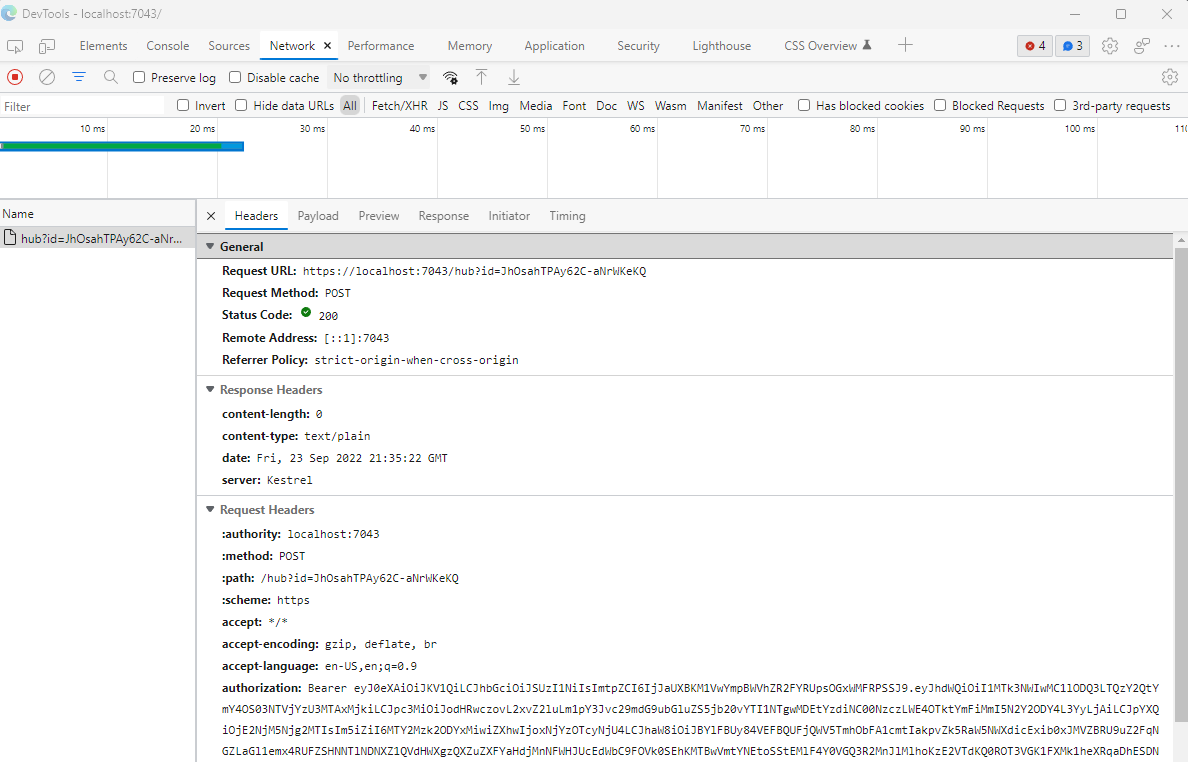
However, the server doesn’t know anything about the client authentication - it isn’t watching for it.
The server side of authentication
To fix the hub to recognize the authentication, just add an [Authorize] attribute to it.
Set a breakpoint at the Clients.All.SendAsync() call, and inspect the context:
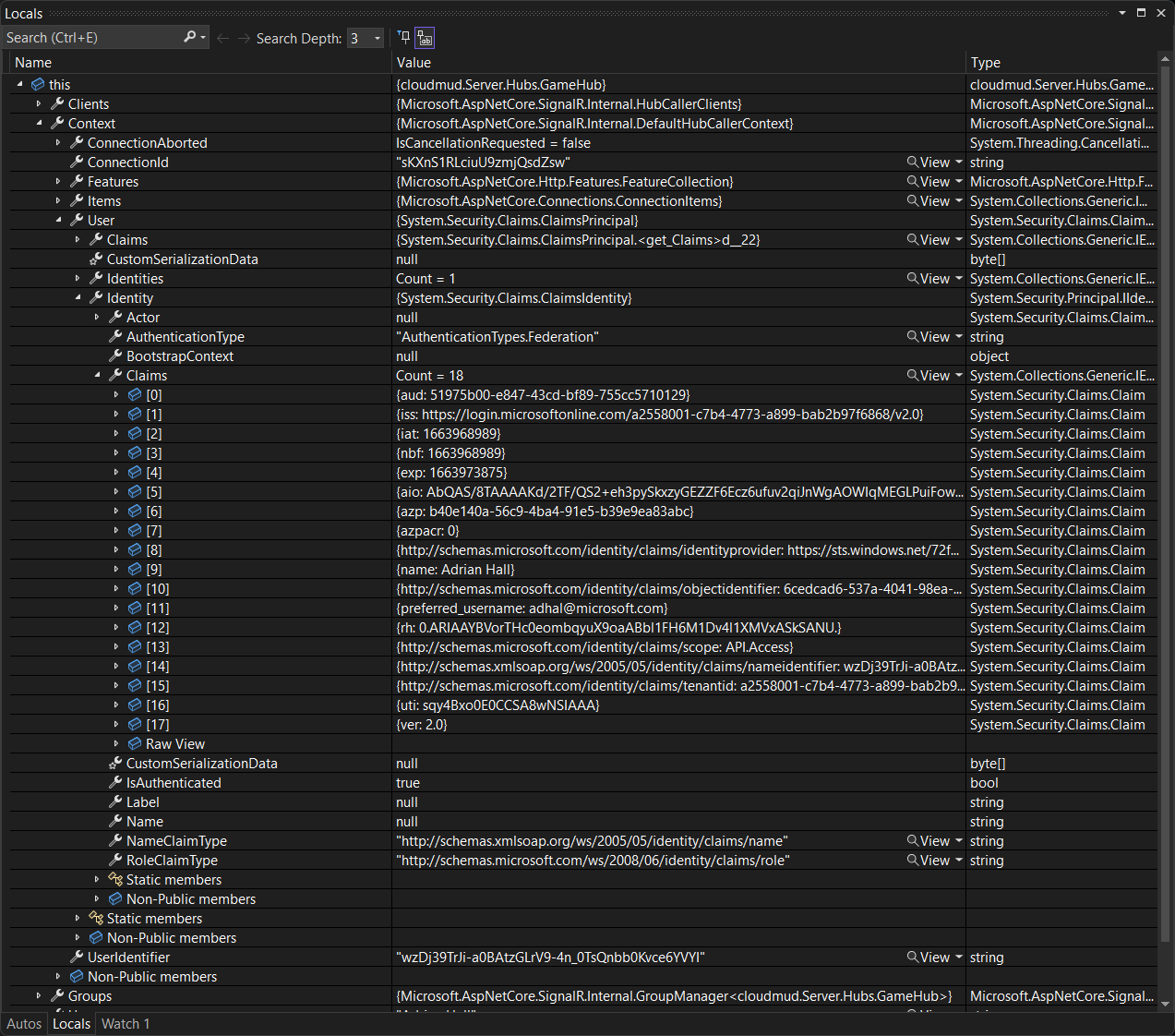
I want to call your attention to a couple of things:
- You can’t use
Context.User.Name- it’s not filled in. - You can use
Context.User.Identity.Claimsto get a real name. - You can use
Context.UserIdentityas a unique and stable ID for the user.
In my game, I’m going to do a database lookup on the Context.UserIdentity to get the “name” of the character being played. In this example, though, I’m going to use the “Name” claim for the username:
private string? Username{ get => Context.User?.Claims?.FirstOrDefault(c => c.Type.Equals("name", StringComparison.OrdinalIgnoreCase))?.Value ?? "-";}If you try out the app now, you will see that your messages are echoed back to you with your name. If another user logs in (to a different web browser), you will see their messages appear with their name as well. Real-time pub/sub with authentication achieved!
Comments